Change your voice live, in every app.
VoiceChange is a free desktop voice changer for Discord, games, Zoom and streaming. The AI voices run on your own computer, so you sound different the moment you speak.
Download free for WindowsVersion 0.1.12, 20 MB. Windows 10 or 11, 64-bit.
Hear the difference
Your voiceMic, no voice on
IrisAI voice
GarnetAI voice
HazelAI voice
OpalAI voice
WillowAI voice
PoppyAI voice
SlateAI voice
JunoAI voice
MirthAI voice
KestrelAI voice
RowdyAI voice
SterlingAI voice
CinderAI voice
ClementineAI voice
SunnyAI voice
PipAI voice
HoneyAI voice
TinkAI voice
ThornwickAI voice
Works anywhere you can pick a microphone
- Discord
- Zoom
- OBS Studio
- Twitch
- Microsoft Teams
- Google Meet
- Fortnite
- Valorant
- Roblox
- Among Us
- TeamSpeak
- Skype
From your mic to the new voice. Fast enough that the people you talk to hear no lag.
Runs on your processor with no graphics card needed, so games keep their frame rate.
The AI runs on your computer. Your voice never goes to a server.
Talk in a new voice on Discord in three steps
Install VoiceChange
Download the app above and open it. Click Set up virtual mic and it installs a free virtual microphone for you (BlackHole on Mac, VB-CABLE on Windows) in one step.
Pick a voice and switch it on
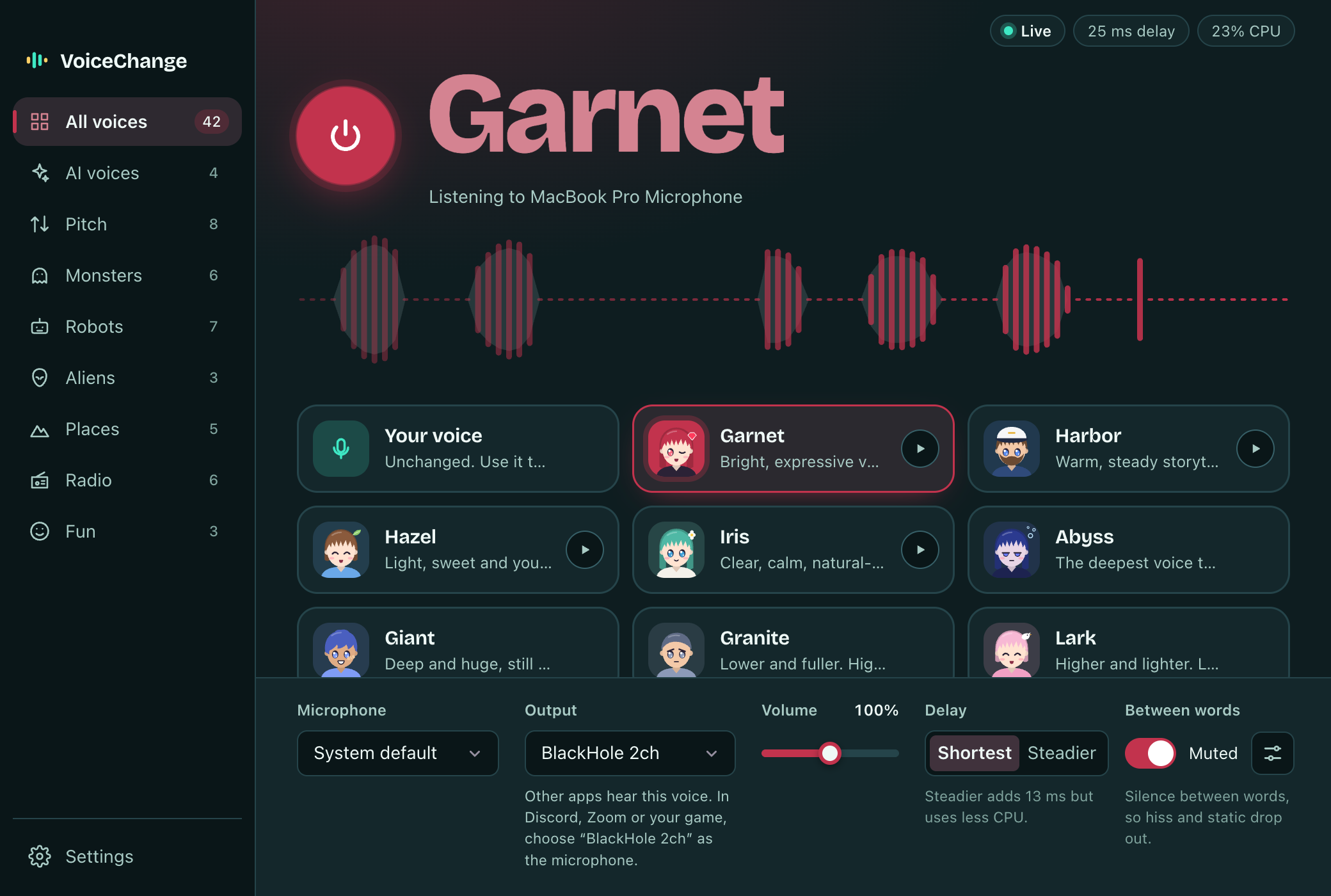
Choose a voice and press the power button or Space. The trace shows your voice and the new one as you talk.
Pick the virtual mic in Discord
In Discord, open User Settings, Voice & Video, and set Input Device to BlackHole 2ch (Mac) or CABLE Output (Windows). The same works in Zoom, OBS, Teams and in-game voice chat.
Downloads and system requirements
| Windows | Windows 10 or 11, 64-bit | Windows installer (.exe)20 MB |
|---|---|---|
| macOS | macOS 11 or newer on Apple Silicon (M1 or later) | macOS disk image (.dmg)11 MB |
| Linux | 64-bit (x86_64). AppImage for any distro, .deb for Ubuntu and Debian | AppImage96 MB.deb for Ubuntu and Debian18 MB |
Version 0.1.12, released 2026-11-14. Updates are free.
Questions
Is it really free?
Yes. The app and its voices are free, with no account, trial or watermark.
Does my voice get uploaded anywhere?
No. The AI voice runs on your own computer, so your audio never leaves it. The app sends anonymous usage stats (which voice, how long it was on, the delay) so we know what to improve. It never sends audio or device names, and you can switch it off in the app.
How do I use it in Discord, Zoom or a game?
Those apps need a microphone to listen to. On first launch VoiceChange offers to set up a free virtual microphone for you (BlackHole on Mac, VB-CABLE on Windows) and sends your new voice to it. Then choose BlackHole 2ch or CABLE Output as the microphone in Discord or your game. On Linux, create a virtual sink with PipeWire or PulseAudio and pick it as the Output.
Windows shows a SmartScreen warning.
New apps without a long download history get this warning. Click More info, then Run anyway.
Will it slow down my games?
It uses about a quarter of one CPU core and no graphics card, so games keep their frame rate. If your computer is busy, pick the Steadier setting, which uses less CPU for 13 ms more delay.
Which voices are included?
The app includes Blaze, a bright hero voice, and Iris, a clear and natural-sounding voice. More voices are added with free updates. For the full catalog of 100+ voices on recordings and text, use the voice changer on voicechange.io.